Overview
EasyTunnel is a preliminary sizing calculator for low-speed open-circuit wind tunnels. It is intended for study, early feasibility work, and quick design iteration.
The calculator starts from the test section because that is where the useful flow condition is defined. From the test-section size and target speed, the tool estimates section velocities, Reynolds number, pressure losses, boundary-layer blockage, energy ratio, and approximate motor power requirement.
The method follows the low-speed wind tunnel design approach set out in Low-Speed Wind Tunnel Testing by Barlow, Rae and Pope, adapted into a transparent study tool. Additional design choices are explained below so that the user can see why the simplified geometry and validity checks have been selected.
Download EasyTunnel
EasyTunnel is available as a Windows installer. The installer adds EasyTunnel to Windows, creates an uninstaller, and gives the option to create a desktop shortcut during setup.
Download EasyTunnel for Windows Open methodology notes
Current version: EasyTunnel v0.2.8. Windows may show a security warning because this early release is not code-signed.
Tool status
EasyTunnel currently supports preliminary sizing for open-circuit, low-speed wind tunnels with rectangular contraction, test section, and diffuser sections.
The current version includes section-by-section loss estimates, motor power estimation, boundary-layer blockage checking, PDF design report export, and a design-envelope explorer for comparing feasible candidate geometries.
The tool is still under active development. It does not yet include fan curve matching, settling chamber screens, honeycomb losses, acoustic treatment, structural design, or full CFD validation.
Why I made it
Early wind tunnel sizing can become awkward because the important quantities are coupled. Test-section speed affects dynamic pressure. Area ratios change local velocity. Section losses affect pressure drop, and pressure drop affects the motor power estimate.
EasyTunnel keeps these relationships in one place. The goal is not to hide the method, but to make the sizing logic visible enough that the user can see why the result changes.
Method summary
Reference test section
The test section is used as the reference section because it is where the target operating condition matters most. The user specifies the target test-section Mach number, and EasyTunnel calculates the corresponding velocity from the local speed of sound. The resulting Reynolds number is then reported as an output rather than forced to match a full-scale condition.
This is deliberate. For small educational tunnels, matching both Mach number and Reynolds number can require very high flow speeds, pressurised operation, a very large tunnel, or an impractically small model chord. EasyTunnel therefore treats the Mach number or test-section speed as the main operating input, then reports the Reynolds number produced by the selected geometry.
Area-ratio scaling
For a preliminary low-speed calculation, continuity links area and velocity. A smaller area gives a larger velocity, while a larger area gives a smaller velocity. The tool uses the test-section area as the reference area, then estimates average section quantities for the contraction and diffuser.
Pressure loss and power
Each section is assigned an approximate loss coefficient. These losses are accumulated into a total pressure-drop estimate, which is then combined with volume flow rate to estimate motor power.
Total-pressure loss is used because it represents the loss of useful mechanical energy in the flow. Reductions in total pressure are associated with viscous dissipation, boundary-layer growth, turbulence, expansion losses, and other irreversible effects. This is why EasyTunnel reports loss coefficients, energy ratio, and approximate motor power rather than only reporting the geometry.
Design rationale and reference basis
Rectangular and square sections
The present version assumes a rectangular test section and square inlet/outlet reference sections. This keeps the tool suitable for student-scale and laboratory-scale tunnels, where rectangular construction is common and convenient for model mounting, optical access, and simple fabrication.
This assumption is also consistent with the development notes consulted for the tool. Göv (2021) compared square and circular sectioned low-speed wind tunnel performance and reported comparable turbulence intensities, supporting the use of a square or rectangular section for preliminary low-speed studies.
Contraction length
EasyTunnel currently sets the contraction length using the simplified relation Zc = Xc,i, where Xc,i is the square contraction inlet width. For a square inlet, the inlet hydraulic radius may be interpreted as roughly half the inlet width. This means Zc = Xc,i corresponds to an approximate contraction length of L ≈ 2Ri.
This choice is included because contraction length is a compromise. A contraction that is too short can produce poor outlet uniformity, while a contraction that is unnecessarily long increases wall boundary-layer growth, friction, cost, and space requirement. Seyhun Durmuş, in Optimization of contraction cone length in an open-circuit wind tunnel, found that L = Ri did not produce uniform outlet flow, while L = 2Ri, 3Ri, and 3.5Ri did. The same notes identify L ≈ 2Ri as the best compromise between boundary-layer thickness and outlet-flow uniformity.
Mikhail (1979) is also used as background support for choosing contraction lengths in the region of approximately 2–2.5Ri. EasyTunnel does not yet model the detailed contraction wall profile, so this should be understood as a simplified length rule for early sizing rather than a complete contraction-design method.
Boundary-layer blockage check
EasyTunnel estimates the wall boundary-layer blockage in the test section because the boundary layer reduces the effective core-flow area. The present methodology estimates the boundary-layer area and compares it with the test-section area. Designs are flagged when the blockage estimate exceeds BL ≤ 0.07.
This is a screening check, not a final flow-quality validation. A complete wind tunnel design would also need model blockage assessment, wall-interference correction, turbulence-intensity measurement, fan selection, flow conditioning, and experimental calibration.
Design-envelope explorer
The default values in EasyTunnel should be treated as starting points rather than universal optimum values. The Design Envelope Explorer is included so that the user can vary contraction ratio, diffuser area ratio, and diffuser half-angle, then compare feasible candidate geometries by motor power, total length, loss coefficient, and blockage. This makes the tool more useful for teaching design trade-offs rather than simply returning one fixed result.
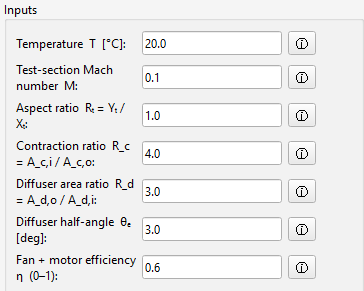
Inputs
- Target test-section Mach number
- Test-section width, height, and area
- Contraction area ratio
- Diffuser geometry and area ratio
- Air density and viscosity assumptions
- Approximate loss-coefficient assumptions
Outputs
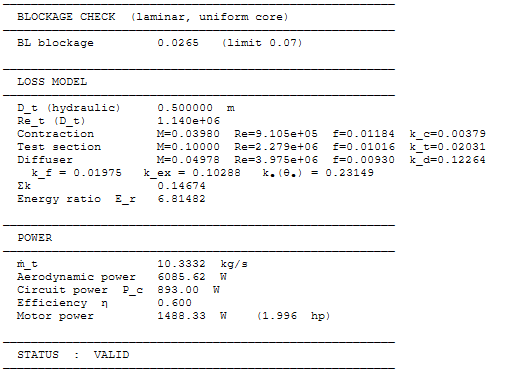
- Estimated local section velocities
- Reynolds number estimate
- Dynamic pressure estimate
- Section and total pressure-loss estimates
- Boundary-layer blockage check
- Approximate fan or motor power requirement
- PDF design report export
- Design-envelope explorer ranking table
Limitations
EasyTunnel is an order-of-magnitude sizing tool. It does not replace detailed wind tunnel design, fan selection, acoustic treatment, flow-quality assessment, structural design, or experimental validation.
The current model does not include settling chamber screens, honeycomb losses, fan-curve matching, inlet/exit losses, acoustic treatment, or detailed contraction-wall profiling. The outputs should be treated as early design estimates, not final design values.
References and source basis
EasyTunnel is an educational implementation of simplified low-speed wind tunnel sizing relations. The full derivation and formulae are given in the methodology notes linked above. The following references are used as the source basis for the public explanation and current design assumptions.
- Barlow, J. B., Rae, W. H. and Pope, A. Low-Speed Wind Tunnel Testing. Core wind tunnel design and loss-modelling reference.
- Durmuş, S. Optimization of contraction cone length in an open-circuit wind tunnel. Used to justify the simplified contraction length choice of approximately L ≈ 2Ri.
- Göv, I. (2021). Comparison of Square and Circular Sectioned Wind Tunnel Performance. Used as support for square/rectangular low-speed test-section assumptions.
- Mikhail, M. N. (1979). “Optimum design of wind tunnel contractions”, AIAA Journal, 17(5), pp. 471–477. Used as background support for practical contraction length ranges.
- Anderson, J. D. Fundamentals of Aerodynamics. Used as background for interpreting total-pressure loss as a measure of useful mechanical energy loss in the flow.
- NASA NTRS low-speed aerodynamic and wind tunnel reports consulted during development for comparison cases and section-loss data.